BIM definition & meaning. What is BIM in construction?
See how Revizto fits your workflow
BIM (Building Information Modeling) has changed how construction projects get built. It brings everyone into one shared digital model: architects, engineers, contractors, owners. Less back-and-forth. Fewer surprises on site. This article covers what BIM is, how it works, and why it matters.
A building is more than its blueprints. Before the first steel goes up, dozens of teams have to agree on thousands of details. Conflicts between systems get discovered. Budgets hold, or they don't.
Building information modeling (BIM) is the process that makes all of that coordination possible. It's a shared digital model that every discipline works from: architects, structural engineers, MEP teams, contractors. Everyone sees the same information. Everyone works from the same source of truth.
In many countries, BIM is now a government requirement for public projects. In others, it’s simply how serious teams operate.
What is BIM?
Building information modeling (BIM) is a highly sophisticated process that takes advantage of vast collaborative possibilities to allow both stakeholders and professionals in various fields to work together within a unified 3D model. It represents a significant change to the way construction projects are conceived, planned, executed, and maintained.
Significance of BIM in modern construction
BIM has rapidly evolved from an innovative technology to an essential business practice in today’s construction landscape. Its ability to address some of the more persistent challenges of the industry is the primary reason for its significance in modern construction workflows:
- Enhanced collaboration: BIM removes traditional silos between architects, engineers, contractors, and facility managers by bringing in a shared digital workspace where all stakeholders contribute to the same model simultaneously.
- Improved decision-making: The centralization of project information using a single, accessible model allows BIM to facilitate informed decisions using real-time, accurate information.
- Risk mitigation: By simulating the construction process digitally before it begins, BIM can identify potential issues and clashes early on to prevent costly mistakes.
- Sustainable design: BIM tools can analyze various design alternatives for their environmental impact, energy consumption, and sustainability metrics.
- Asset management: The BIM model becomes a valuable resource for managing and maintaining a building throughout its lifecycle beyond the initial construction phase.
Key components of BIM
BIM is not a single tool or software but rather a comprehensive ecosystem of integrated components that work together to facilitate collaboration and information management throughout the lifecycle of a building project.
3D modeling
At the heart of BIM is a 3D model that serves as a digital prototype of the building. Unlike traditional 2D drawings, this model is a dynamic, data-rich representation that allows all project stakeholders to visualize and interact with the building in a more intuitive and comprehensive manner. This 3D aspect is the visual foundation for the myriad other components of BIM, enabling the detailed planning and design that BIM is known for.
Data management
BIM transcends the limitations of traditional design by embedding rich data within its 3D models. This data encompasses a wide range of information, from material specifications and performance data to cost estimates and maintenance schedules. The result is a comprehensive digital repository that serves as the single source of truth for all project information, ensuring that all team members work from the same, up-to-date data.
Collaboration and coordination
BIM facilitates a new level of collaboration by providing a shared environment in which all stakeholders can work together in real-time, regardless of geographical location. This collaborative approach ensures that all disciplines, from architects to engineers and contractors, can contribute to and access the same model, reducing information gaps and improving coordination across the project team.
Clash detection
One of the most valuable features of BIM is its ability to perform clash detection, a process that identifies conflicts between different building systems (e.g., structural, mechanical, electrical, and plumbing) within the 3D model. By catching these clashes early in the design phase, BIM helps to avoid costly errors and rework during construction.
Simulation and analysis
BIM enables the simulation and analysis of various aspects of a building, such as structural integrity, energy efficiency, lighting conditions, and emergency egress plans. These simulations allow for the optimization of the building’s design and performance before any physical construction begins, ensuring that the final structure meets all necessary requirements and standards.
Documentation and reporting
BIM automates the generation of project documentation, from detailed drawings and specifications to quantity takeoffs and cost reports. This automation not only reduces the time and effort required to produce these documents but also ensures their accuracy and consistency with the 3D model, providing a reliable basis for project planning and management.
BIM dimensions: Beyond 3D
Building information modeling extends beyond the realm of three-dimensional space to include additional layers of information that provide a more comprehensive view of a project. These dimensions, from 3D to 8D, each add a specific type of data or analysis capability to the BIM model, allowing for a more nuanced understanding and management of the construction project lifecycle.
3D BIM: The foundation
3D BIM is the baseline of the BIM methodology, representing the physical structure of a building in three dimensions. This model serves as the visual and data repository for all other BIM dimensions, providing a tangible representation of the final structure that all stakeholders can interact with and understand.
4D BIM: Time
The fourth dimension adds time to the BIM model, linking the 3D model to the project schedule. This temporal dimension allows project teams to simulate the construction process, visualize the sequence of construction activities, and identify potential scheduling conflicts before they occur on the job site.
5D BIM: Cost
5D BIM incorporates cost data into the model, enabling the automatic generation of cost estimates and budgets based on the quantities and specifications within the model. This financial layer allows for more accurate cost management and the ability to assess the financial implications of design decisions in real time.
6D BIM: Sustainability
The sixth dimension focuses on the sustainability and energy performance of the building. 6D BIM enables the analysis of various energy efficiency measures and the assessment of the building’s environmental impact throughout its lifecycle, supporting the design of more sustainable structures.
7D BIM: Facility management
7D BIM extends the value of the BIM model beyond the construction phase and into the operational life of the building. This dimension includes information relevant to facility management, such as equipment maintenance schedules, product warranties, and operational data, which can be used to manage and maintain the building efficiently over time.
8D BIM: Safety
The eighth dimension addresses health and safety aspects of the construction project. 8D BIM incorporates safety planning information into the model, allowing teams to simulate construction processes and identify potential safety hazards before work begins, thereby reducing the risk of accidents and improving overall project safety.
BIM standards and levels
Building information modeling is governed by a set of standards and levels that define the degree of detail and collaboration involved in a project. These standards help ensure consistency, interoperability, and effective communication across different stakeholders in the construction industry.
BIM levels
BIM levels describe the maturity and sophistication of BIM usage within a project. They range from Level 0, where there is no collaboration and only 2D CAD drawings are used, to Level 3, where there is a fully integrated and collaborative process with a shared project model accessible to all stakeholders. Level 2 is mandatory for all UK government-funded projects, requiring the use of collaborative 3D BIM with managed 3D environments and data sharing through a common data environment.
ISO 19650
ISO 19650 is an international standard for managing information over the whole life cycle of a built asset using BIM. It provides guidelines and principles for information management using building information modeling in a collaborative environment, ensuring a consistent approach to information management across international borders.
Industry Foundation Classes (IFC)
Industry Foundation Classes (IFC) is a standardized, digital description of the built environment, including buildings and civil infrastructure. It is an open, international standard (ISO 16739-1) and serves as a neutral data format that enables different BIM software applications to exchange information seamlessly, promoting interoperability across the industry.
BIM Execution Plan (BEP)
A BIM Execution Plan (BEP) is a document that defines how BIM will be implemented on a project. It outlines the project’s BIM goals, team roles and responsibilities, software and hardware requirements, and the standards and processes that will be used to manage BIM data throughout the project lifecycle.
BIM in the project lifecycle
Building information modeling is a transformative approach that spans every phase of a building’s lifecycle, from initial conception to eventual demolition. Let’s explore how BIM is applied and its benefits at each stage.
Pre-design and planning
In the pre-design and planning stage, BIM is used for site analysis and feasibility studies. By integrating geographic information system (GIS) data with BIM, project teams can analyze the site conditions, including topography, existing structures, and environmental factors. This stage also involves preliminary cost estimating and budgeting, where BIM’s 5D capabilities allow for early financial planning.
Design development
During the design development phase, architects and engineers use BIM to create detailed 3D models that incorporate all building systems. The collaborative nature of BIM allows for the simultaneous development of architectural, structural, and MEP (mechanical, electrical, plumbing) designs, with real-time clash detection to identify and resolve conflicts early in the process.
Construction documentation
BIM streamlines the creation of construction documents by automatically generating accurate and coordinated drawings, specifications, and quantity takeoffs from the model. This reduces errors and inconsistencies in the documentation, ensuring that contractors receive clear and precise instructions for the construction process.
Construction and project management
During construction, BIM supports project management by providing a platform for scheduling (4D BIM) and cost control (5D BIM). Project managers can use BIM to track progress, manage resources, and monitor costs against the project plan. BIM also facilitates on-site coordination and communication between different trades, reducing conflicts and improving efficiency.
Post-construction and facility management
After the building is completed, the BIM model becomes a valuable tool for facility management (7D BIM). Building owners and facility managers can access the model to retrieve information about the building’s systems, equipment, and materials, aiding in maintenance planning and management. The model can also be updated to reflect any changes or renovations to the building, providing an accurate record of its current state.
BIM and related technologies
Building information modeling doesn’t operate in isolation; it synergizes with a host of related technologies to enhance its capabilities and applications in the construction industry.
BIM and GIS integration
The integration of BIM with Geographic Information Systems (GIS) bridges the gap between building-level data and the broader geographic context. This combination allows for enhanced site analysis, urban planning, and environmental impact assessments. By overlaying BIM data on GIS maps, project teams can make more informed decisions about site selection, orientation, and the interaction between the built and natural environments.
BIM and digital twins
A digital twin is a virtual replica of a physical building or infrastructure, updated in real time with data from sensors and other sources. BIM serves as the foundation for creating digital twins, providing the detailed geometric and data-rich model necessary for this advanced simulation. Together, BIM and digital twins enable continuous monitoring, performance optimization, and predictive maintenance of buildings throughout their operational lives.
BIM and IoT
The Internet of Things (IoT) connects physical devices and systems within a building, providing real-time data on everything from energy consumption to occupancy patterns. When integrated with BIM, IoT data can enhance the BIM model with live operational information, facilitating more effective facility management and enabling predictive maintenance strategies. This integration can lead to more efficient building operations and reduced operational costs.
BIM and AI
Artificial Intelligence (AI) is increasingly being applied in conjunction with BIM to automate complex tasks, analyze large datasets, and generate predictive insights. AI can enhance BIM workflows by automating clash detection, generating optimized design solutions, and predicting project outcomes. The combination of AI and BIM is set to revolutionize the way buildings are designed, constructed, and managed, driving greater efficiency and innovation in the construction industry.
BIM and AR/VR
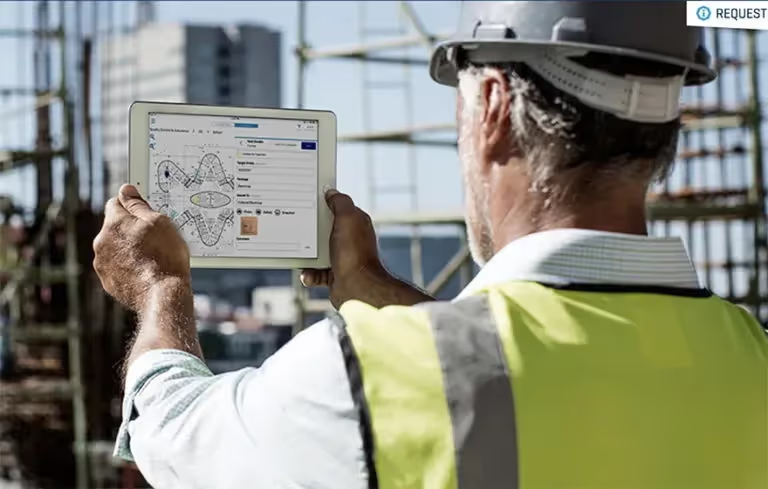
Augmented Reality (AR) and Virtual Reality (VR) technologies complement BIM by providing immersive visualization experiences. AR can overlay BIM data onto the physical environment, allowing construction workers to see the digital model superimposed on the actual job site, improving accuracy and reducing errors. VR, on the other hand, enables project teams and clients to explore and interact with the BIM model in a virtual space before construction begins, facilitating better design review and decision-making.
BIM implementation challenges
While BIM offers significant advantages, its implementation is not without challenges. Understanding these hurdles is crucial for organizations looking to successfully integrate BIM into their workflows.
Initial costs and ROI
The upfront investment in BIM can be substantial. Organizations must consider the costs of BIM software, hardware upgrades, training, and the potential need to restructure workflows. Demonstrating a clear return on investment (ROI) is often challenging, particularly in the short term, as the benefits of BIM may not be immediately apparent or quantifiable.
Training and skill development
BIM requires a skilled workforce that is proficient in using BIM tools and methodologies. Training existing staff and recruiting new talent with BIM expertise can be time-consuming and costly. Additionally, the rapid evolution of BIM technology means that continuous learning and skill development are necessary to keep pace with industry advancements.
Interoperability and data exchange
Despite the existence of open standards like IFC, achieving seamless interoperability between different BIM software platforms can still be challenging. Data exchange issues can lead to information loss or errors when models are transferred between different software systems, which can undermine the collaborative potential of BIM.
Organizational culture and resistance to change
Implementing BIM often requires a cultural shift within an organization. Resistance to change from staff accustomed to traditional workflows can hinder BIM adoption. Overcoming this resistance requires strong leadership, clear communication of BIM’s benefits, and a supportive organizational culture that encourages innovation and continuous improvement.
The future of BIM
The trajectory of building information modeling points towards a more integrated, intelligent, and interconnected future. Several emerging technologies and industry trends are set to shape the evolution of BIM in the coming years.
Cloud-based BIM
The shift towards cloud-based BIM platforms is enabling greater accessibility, scalability, and collaboration across the construction industry. Cloud-based solutions allow project teams to access and collaborate on BIM models from anywhere, at any time, breaking down geographical barriers and facilitating real-time collaboration. This shift also supports the storage and processing of large BIM datasets, enabling more complex simulations and analyses.
Generative design
Generative design, powered by AI and machine learning algorithms, is set to transform the way buildings are designed. By inputting design goals and parameters, generative design tools can automatically generate and evaluate thousands of design alternatives, identifying the optimal solutions based on the specified criteria. This approach can lead to more innovative, efficient, and sustainable building designs, pushing the boundaries of what is possible in construction.
Predictive analytics
The integration of predictive analytics with BIM is set to enhance project planning and management significantly. By analyzing historical data and current project information, predictive analytics can forecast project outcomes, identify potential risks, and recommend mitigation strategies. This capability will enable project teams to make more informed decisions, reduce uncertainties, and improve overall project performance.
Increased regulation and standardization
As BIM continues to gain traction globally, we can expect to see increased regulation and standardization around its use. Governments and industry bodies are likely to introduce more stringent BIM requirements for public projects, and international standards will continue to evolve to address emerging challenges and technologies. This increased regulation will drive greater consistency and quality in BIM implementation across the industry.
Implementing BIM: Best practices
Successful BIM implementation requires careful planning, the right tools, and a commitment to collaboration. Here are some best practices to guide your BIM journey.
Starting with a clear BIM strategy
Before diving into BIM, it’s essential to define a clear strategy that aligns with your organization’s goals and project requirements. This strategy should outline the BIM standards you’ll follow, the software you’ll use, the level of detail required in your models, and the workflows you’ll adopt. A well-defined strategy provides a roadmap for BIM implementation and helps ensure that all stakeholders are aligned and working towards the same objectives.
Choosing the right BIM software
The selection of BIM software is a critical decision that can significantly impact the success of your BIM initiatives. When evaluating software options, consider factors such as the software’s capabilities, ease of use, interoperability with other tools, and the level of support available from the vendor. It’s also important to consider the software’s compatibility with the IFC standard for interoperability and data exchange.
Training and education
Investing in training and education is essential for building the BIM expertise within your organization. This includes not only technical training on BIM software but also education on BIM principles, methodologies, and best practices. Encouraging a culture of continuous learning and knowledge sharing can help your team stay up-to-date with the latest BIM advancements and ensure that your organization remains at the forefront of BIM innovation.
Collaboration and communication
Effective collaboration and communication are at the heart of successful BIM implementation. Establishing clear communication protocols, using common data environments (CDEs), and fostering a culture of open collaboration can help ensure that all stakeholders are informed and engaged throughout the project. Regular meetings and coordination sessions can also help to identify and resolve issues promptly, keeping the project on track.
Continuous improvement
BIM implementation is not a one-time effort but an ongoing process of improvement. Regularly reviewing and refining your BIM processes, learning from past projects, and staying informed about emerging BIM technologies and best practices are all key to continuous improvement. Encouraging feedback from all team members and stakeholders can provide valuable insights for enhancing your BIM workflows and outcomes.
BIM in different sectors
Building information modeling has transcended its origins in building construction to become a pivotal tool across various sectors of the built environment, each with its unique applications and benefits.
Architecture and urban planning
In architecture and urban planning, BIM has revolutionized the way buildings and urban spaces are designed and visualized. Architects use BIM to create detailed 3D models that allow for the exploration of design alternatives, the analysis of environmental impacts, and the simulation of user experiences. Urban planners leverage BIM to model entire city districts, analyzing the interplay between buildings, infrastructure, and the natural environment. This holistic approach to design and planning enables more informed decision-making and the creation of more sustainable, livable urban spaces.
Infrastructure and civil engineering
In the realm of infrastructure and civil engineering, BIM is used to design and manage complex projects such as roads, bridges, tunnels, and water systems. BIM’s 3D modeling capabilities allow for the detailed visualization and analysis of infrastructure projects, while its data management features enable the efficient management of large volumes of project information. The integration of BIM with GIS technologies further enhances its applicability in infrastructure projects, enabling the analysis of geographic and environmental factors that are critical to the success of these projects.
Healthcare facilities
Healthcare facilities have unique design and operational requirements that BIM is well-suited to address. BIM enables the detailed modeling of complex healthcare environments, including operating rooms, intensive care units, and specialized medical facilities. This level of detail allows for the optimization of patient flow, the integration of specialized medical equipment, and the planning of infection control measures. BIM also supports the ongoing management of healthcare facilities, providing facility managers with detailed information about the building’s systems and equipment.
Educational institutions
Educational institutions are leveraging BIM to design and manage more efficient, flexible, and sustainable learning environments. BIM’s collaborative capabilities allow for the input of educators, students, and facility managers in the design process, ensuring that the final design meets the needs of all users. BIM also supports the sustainable design of educational facilities, enabling the analysis of energy performance and the optimization of natural lighting and ventilation.
Industrial facilities
In the industrial sector, BIM is used to design and manage complex manufacturing plants, warehouses, and logistics facilities. BIM’s 3D modeling capabilities allow for the detailed planning of production processes, the optimization of material flow, and the integration of complex machinery and equipment. BIM also supports the efficient management of industrial facilities, providing operators with detailed information about the building’s systems, equipment, and maintenance requirements.
Real-world applications of BIM
Building information modeling has proven its value across numerous high-profile projects worldwide, demonstrating its ability to enhance collaboration, improve efficiency, and deliver better project outcomes.
BIM in the construction of complex structures
BIM has been instrumental in the construction of complex structures, such as airports, stadiums, and high-rise buildings. In these projects, BIM’s 3D modeling and clash detection capabilities are used to coordinate the work of multiple teams and ensure that the various building systems fit together seamlessly. For example, BIM was used in the construction of the Sydney Opera House renovation, where it helped to manage the complex coordination of structural, mechanical, and electrical systems.
BIM for infrastructure projects
BIM has been widely adopted in infrastructure projects, such as the construction of the Crossrail project in London, which is one of the most complex infrastructure projects in the world. BIM was used to manage the vast amount of data generated by the project, coordinate the work of thousands of workers, and ensure that the project was delivered on time and within budget. The use of BIM in the Crossrail project is a testament to its ability to handle the complexity of large-scale infrastructure projects.
BIM in sustainable building
BIM is increasingly being used to support the design and construction of sustainable buildings. By simulating the energy performance of buildings and analyzing the environmental impact of design decisions, BIM helps architects and engineers to design buildings that are more energy-efficient and sustainable. For example, BIM was used in the design of the Bullitt Center in Seattle, which is one of the world’s most sustainable commercial buildings, to analyze and optimize the building’s energy systems and ensure that it meets the stringent requirements of the Living Building Challenge.
BIM and project management
Integrating BIM and project management is transforming the construction industry by providing project managers with powerful tools for planning, monitoring, and controlling construction projects. BIM enhances project management by providing a centralized platform for collaboration and information management, enabling more effective communication and coordination among project teams. Project managers can use BIM to create detailed project schedules (4D BIM) and cost estimates (5D BIM), enabling more accurate planning and budget management. Real-time access to project data through BIM also allows project managers to monitor progress, identify issues, and make informed decisions quickly, improving overall project efficiency and outcomes.
BIM for owners and facilities managers
For building owners and facilities managers, BIM offers significant benefits that extend well beyond the construction phase. By providing a comprehensive digital record of the building, BIM supports more effective asset management, maintenance planning, and space management. Facility managers can use the BIM model to access detailed information about the building’s systems and equipment, enabling more informed maintenance decisions and reducing downtime. BIM also supports the planning of renovations and modifications, allowing facility managers to assess the impact of changes on the building’s systems and performance before any physical work begins.
How does Revizto work with BIM?
Revizto is a construction project management platform that integrates with leading BIM tools to enhance collaboration, coordination, and project management throughout the AECO (Architecture, Engineering, Construction, and Operations) industry.
By seamlessly integrating with BIM software such as Autodesk Revit, Navisworks, and Bentley MicroStation, Revizto converts complex BIM models into accessible, easy-to-navigate 3D environments. This integration allows all project stakeholders, regardless of their technical expertise, to interact with the BIM model, streamlining communication and collaboration across teams.
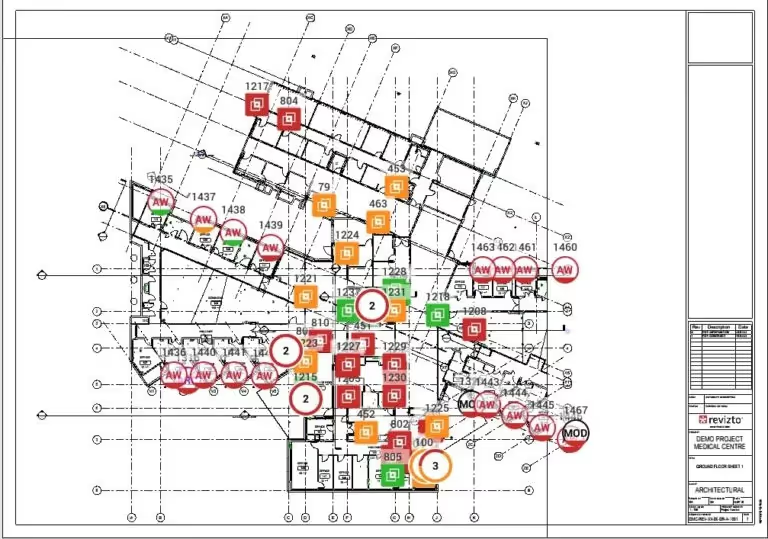
Revizto’s issue tracking and management capabilities are closely tied to the BIM model, allowing users to create, assign, and track issues directly within the 3D environment. This spatial context makes it easier to identify, communicate, and resolve construction issues, reducing errors and improving overall project efficiency.
The platform also supports clash detection workflows by integrating with BIM tools to highlight and manage model conflicts. Revizto facilitates efficient clash resolution by providing a platform where project teams can document, discuss, and track the resolution of clashes, ensuring that all conflicts are addressed before they escalate into costly construction problems.
Revizto also serves as a common data environment for all project information, including BIM models, drawings, documents, and project data. This centralized information management ensures that all project stakeholders have access to the latest project information, reducing the risk of miscommunication and errors.
By enabling real-time collaboration and communication within the BIM environment, Revizto helps project teams to stay aligned and work more effectively together. This enhances the collaborative potential of BIM, making it more accessible and actionable for all team members, from the design office to the construction site.
By bridging the gap between BIM and project management, Revizto helps construction teams to fully realize the benefits of BIM, improving project outcomes and delivering better value for all stakeholders.
FAQs
BIM stands for building information modeling. It’s a shared digital model of a building or infrastructure project that every discipline works from. Not just geometry. Real data: materials, systems, costs, schedules. The kind of information that used to live in separate spreadsheets, emails, and people’s heads.
A BIM coordinator keeps the federated model accurate and the information flowing between disciplines. They run clash detection, manage the common data environment, and make sure every team is working from the same version of the project. On large jobs, it’s a full-time role. It’s also one of the most in-demand positions in construction right now.
BIM software generally falls into two categories: authoring tools and coordination platforms. Authoring tools like Revit or ArchiCAD are where models are built. Coordination platforms are where teams bring those models together, track issues, and manage the project from design through to handover. Revizto sits in that second category, connecting models from every discipline into one environment that field teams, project managers, and owners can all work from.
Yes, and it is worth asking this before committing to any platform. The best coordination tools are built so that a site supervisor, a project owner, or a subcontractor with no BIM background can navigate a model, log an issue, and track its resolution without a training course. Most platforms are built for VDC teams. The better ones are built for everyone on the project.