Drawing management: 2D sheet versioning
See how Revizto fits your workflow
Construction professionals waste roughly 35% of their time on non-productive activities like searching for the right project documents. On a construction project with 200 drawing sheets and six revisions each, that’s 1,200 document versions floating around your team. One wrong revision reaching the job site doesn’t just cause confusion - it triggers rework that eats into your margin.
A modern drawing management system automates versioning, links issues to specific locations on sheets, and pushes the latest set of construction drawings to field teams’ mobile devices - even without an internet connection. The best drawing management software connects 2D sheets to 3D models, tracks every revision, and makes construction documentation accessible to every stakeholder who needs it.
This guide covers the core components of a reliable system, a tool comparison, common mistakes, and a workflow to get your construction drawing management right.
Why drawing management matters more than ever
Construction projects are getting more complex. Multi-discipline teams, tighter timelines, and distributed stakeholders mean the volume of project drawings and documents keeps growing. The AI-powered design tools market is expected to reach $14.92 billion by 2029, and the construction document management software market hit $2.49 billion in 2024 with an 8.8% CAGR. The industry is investing heavily in efficiency - and better management systems to achieve it.
Yet the shift from paper to digital hasn’t solved the core problem. Storing files across email, Dropbox, and SharePoint is just the digital version of the same paper-based mess. A single outdated drawing reaching the field can trigger change orders, schedule delays, and expensive mistakes.
The gap between “drawings stored somewhere” and “drawings that construction teams actually trust” is a process and tooling problem. The best management systems connect drawings to models, issues, and people - turning document management into a coordination advantage.
Core components of effective construction drawing management
Central repository and single source of truth
Every reliable drawing management system starts with centralized storage. Engineering files carry DWG metadata, external references, and revision histories that general file systems handle poorly. A Common Data Environment (CDE) gives your entire team one access point for all project related documents, with role-based permissions controlling who can view, edit, or approve drawings.
Without a central repository, project files scatter across local drives, email attachments, and cloud folders. For example, an architect emails Rev C while Rev D already exists in the CDE - and a subcontractor installs from the out-of-date version. Centralizing construction documentation eliminates this risk.
Sheet organization and metadata
On a large construction project, you might manage hundreds of sheets across architectural, structural, MEP, and civil disciplines. Effective organizing relies on consistent naming conventions (for example, discipline code + zone + drawing type + sequence number), metadata tagging for fast search, and automated categorization. Some platforms use OCR to auto-split uploaded sheet sets by title block data - so users can easily find what they need without manual sorting.
Revision control and numbering schemes
Drawing revision management is where most drawing management systems either shine or fall apart. Without proper revision control, you can’t tell whether the sheet in your hand is current or three revisions behind.
Alpha schemes (A, B, C…Z) are typically used during design development. Once drawings are issued for construction, teams reset to numeric (1, 2, 3…). Most standards skip letters I, O, Q, S, X, and Z to avoid confusion with numbers. ASME Y14.35 provides the formal standard for revision documentation on engineering drawings.
The per-sheet vs. per-project revisioning debate:
Per-sheet revisioning follows ASME Y14.35 and is standard on most commercial construction projects. Per-project works for smaller teams where every stakeholder reviews every sheet.
Drawing version control mechanisms
Version control and revision control serve different functions. Revision control tracks formal, approved changes to issued documents. Version control tracks every iteration - including drafts and work-in-progress. Think of it as the difference between controlled documents (formally issued, tracked by revision letter) and uncontrolled documents (working copies not yet released).
Key features include check-in/check-out workflows (document locking to prevent conflicting edits), major vs. minor versions, and complete audit trails showing who changed what and on what date. Organizations that maintain these audit trails aren’t just being thorough - they’re meeting essential requirements for ISO 9001 compliance, dispute resolution, and project closeout documentation.
Drawing comparison and overlay
When a new revision drops, you need to compare revisions quickly. Overlay comparison stacks two versions as colored layers so differences pop visually, while difference highlighting flags additions, deletions, and modifications automatically.
The most powerful approach goes further: overlaying 2D sheets onto 3D models for spatial context. Instead of toggling between separate viewers, you see exactly where a revision falls in three-dimensional space. Platforms like Revizto offer this through a 2D/3D split view - more on that in the tools section below.
Distributing drawings to field teams
The field access challenge
A drawing management system is only as good as its last mile of distribution. Many construction sites have limited connectivity outside the trailer, forcing crews to waste time traveling back just to check documents. If field teams can’t access current drawings at the job site, your version control process breaks down where it matters most.
Mobile-first and offline capabilities
Field distribution in 2026 means mobile devices with offline access - non-negotiable. The best drawing management tools let crews download project data for offline use, add comments and markups in the field, and automatically sync when connectivity returns. Push notifications for new revisions ensure accuracy and efficiency, so nobody works from outdated plans.
Transmittals and controlled sharing
For external stakeholders - subcontractors, clients, regulators - formal transmittals remain essential. A transmittal log creates an auditable record of which drawings were sent to whom and when, critical for contracts and compliance. The best management systems automate transmittal creation so you always know who received the latest set.
Best drawing management tools at a glance
Here’s how the leading drawing management tools stack up:
Let’s break down each platform - starting with the one that bridges the 2D/3D gap most completely.
Best drawing management tools and platforms
Revizto
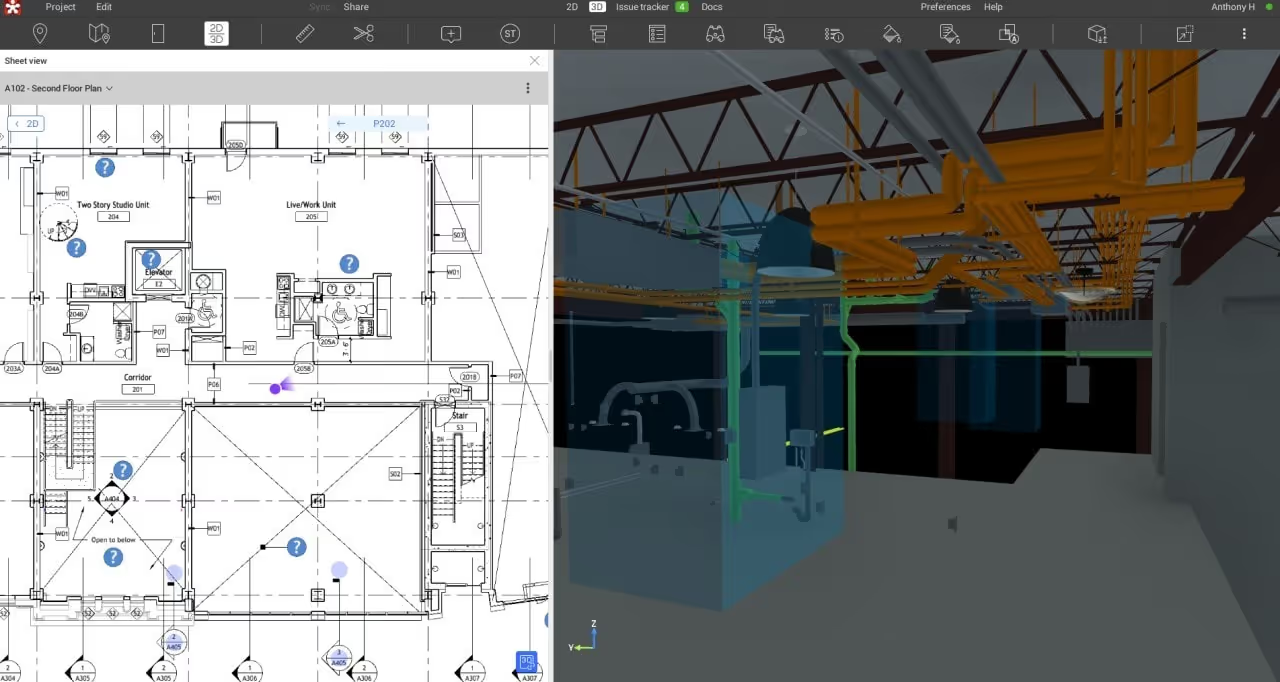
Revizto isn’t a traditional document management system - it’s an integrated collaboration platform that makes drawing management a natural byproduct of better project coordination. Where other tools treat drawings as standalone files to organize and version, Revizto embeds them into a live coordination environment alongside 3D models, issues, and clash results.
The core capability: your 2D sheets and 3D models coexist in one interactive workspace. View a construction drawing and the corresponding model side by side with one click, or overlay sheets directly onto the 3D model for spatial context when reviewing changes. Every issue, markup, and clash detection result ties back to the exact location on the drawing and the model simultaneously - so coordination context is never lost.
For field teams, Revizto offers full offline access. Crews download entire projects to their devices before heading to site, and any issues or markups they log without connectivity sync automatically once they’re back online. That means no printouts, no guessing, and no wasted trips to the trailer.
The platform supports over 100 file formats (Revit, AutoCAD, Navisworks, ArchiCAD, SketchUp, IFC, BCF) and connects to CDEs like Autodesk Construction Cloud, Procore, Box, and SharePoint. Users also get automated clash detection, enterprise-grade security, and reporting dashboards - handling BIM collaboration and construction drawing management without forcing teams to switch tools.
If your team’s biggest pain point is the disconnect between 2D drawings and 3D models - losing context, duplicating issue tracking, dealing with data scattered across platforms - Revizto addresses it at the architecture level. Custom pricing based on team size.
See Revizto in action
Bluebeam Revu
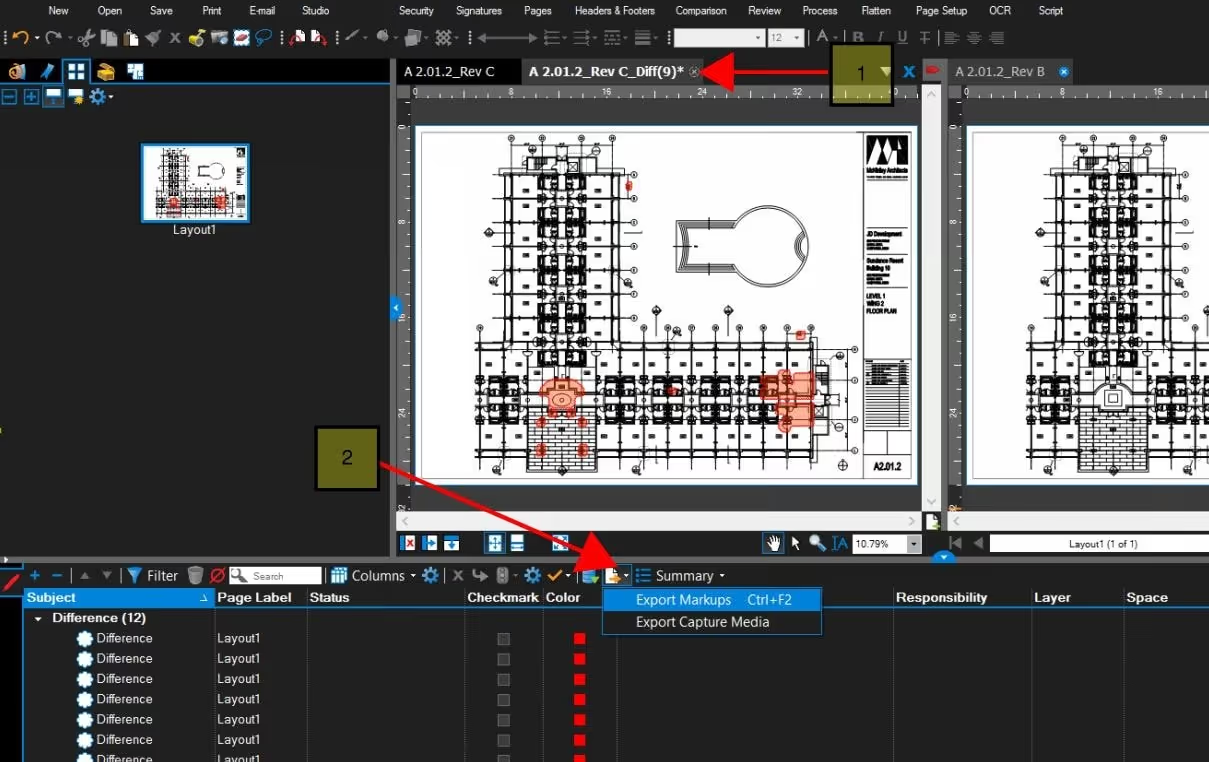
Bluebeam is the industry standard for PDF-based construction drawing management. Automatic sheet matching, color-layered overlay comparison, difference highlighting, and powerful markup tools make it essential for users whose teams collaborate through PDF workflows. Cloud collaboration via Bluebeam Studio enables distributed review.
Limitation: 2D only - no 3D model integration, so drawings and models remain in separate management systems. Pricing starts around $240/year per user.
Autodesk Construction Cloud (ACC)
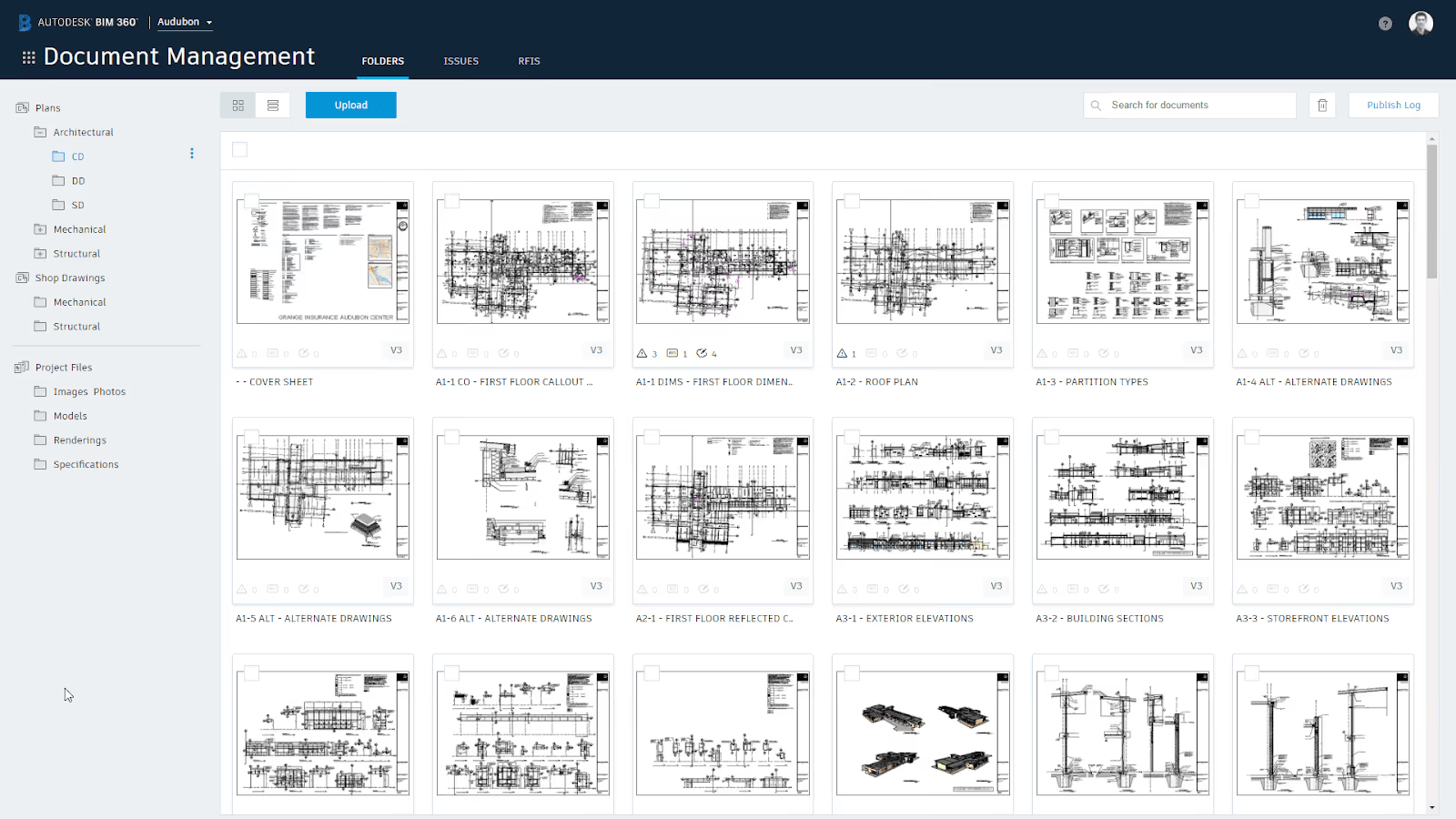
ACC provides drawing management within the Autodesk ecosystem. Advanced features include OCR auto-splitting, automatic versioning, mobile offline access, and deep Revit/AutoCAD integration.
Limitation: Ecosystem lock-in. If your construction project includes non-Autodesk tools (ArchiCAD, SketchUp), interoperability becomes a challenge. Autodesk Docs starts at ~$450/year per user.
Procore
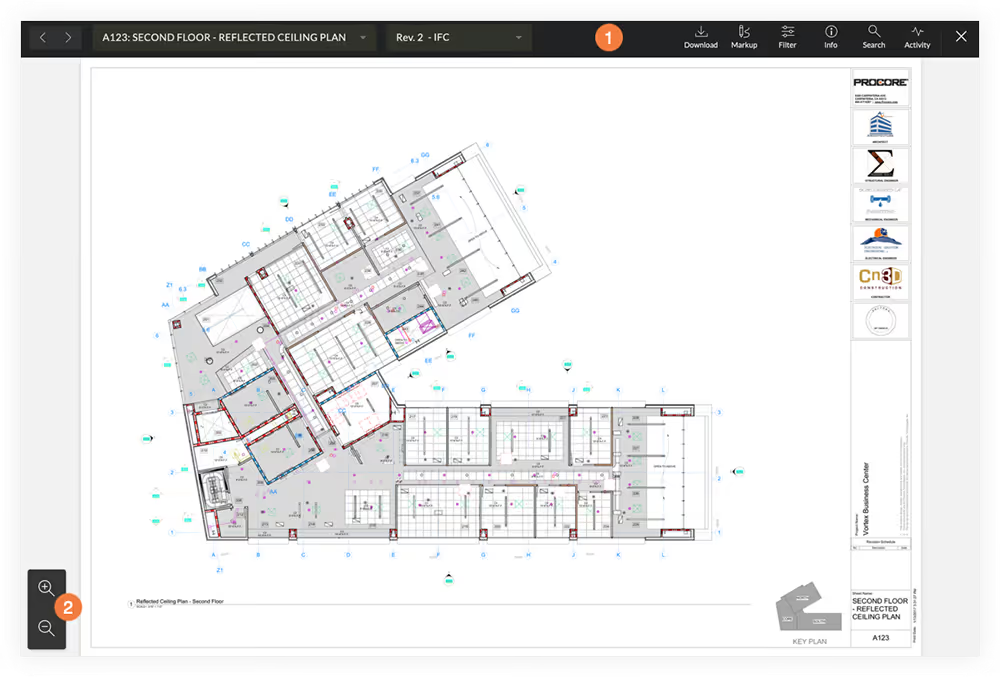
Procore is a comprehensive construction project management platform with a solid drawing module: OCR sheet splitting, version comparison, offline mobile, and RFI-to-drawing linking alongside scheduling and budgeting.
Limitation: Expensive (annual contracts start ~$10,000+) and potentially overkill for companies that only need construction drawing management software without a full PM suite.
Lunr
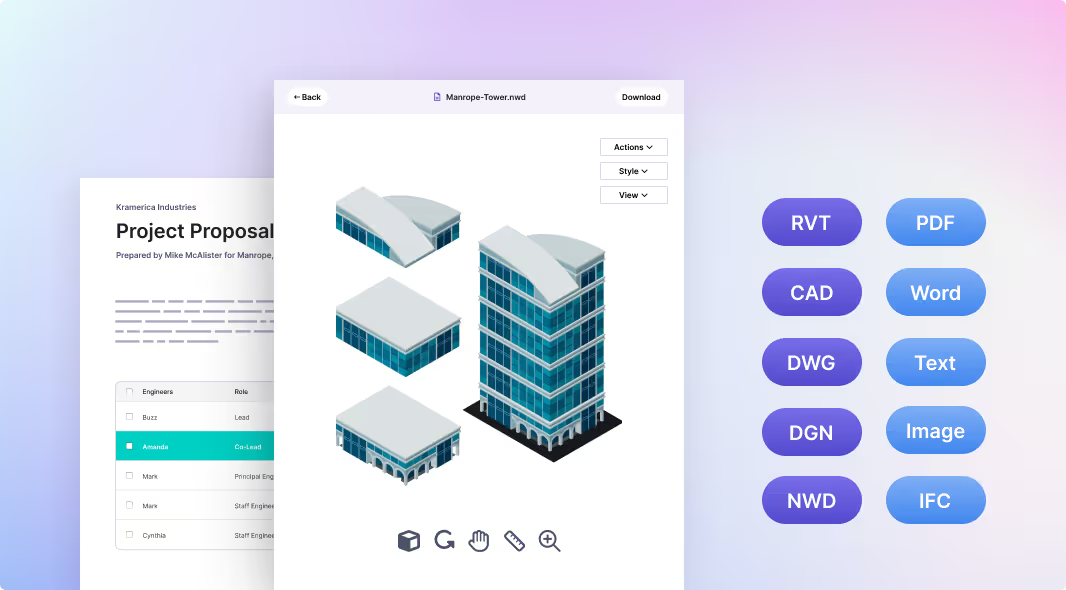
Lunr focuses on engineering content management for asset owners. Native DWG/RVT viewing, title block synchronization, PDF generation, and GIS integration serve organizations managing documents and specifications across decades-long lifecycles.
Limitation: Optimized for long-lifecycle asset management, not active construction site coordination.
Fieldwire (by Hilti)

Fieldwire is a mobile-first platform with plan viewing, task assignment, and markup features for field crews. Offline capable with unlimited sheets on higher tiers. Limitation: Limited version control depth and no 3D model support. Great for getting construction drawings to the site quickly, but won’t help with cross-discipline coordination.
PlanRadar
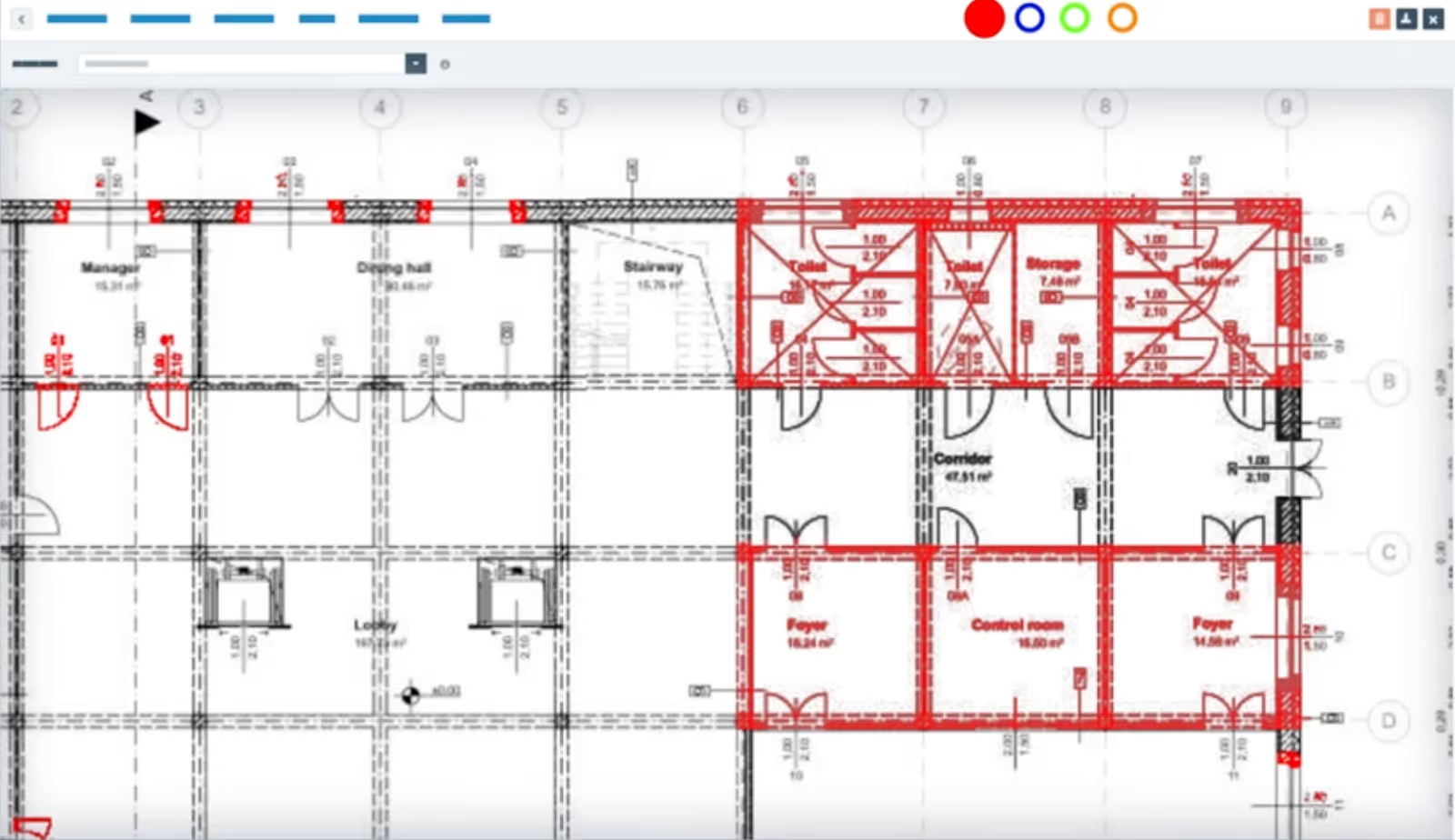
PlanRadar offers cloud-based plan management with automated version notifications, side-by-side comparison, on-plan markups, and BIM support. Teams can add comments directly on drawings for location-specific communication.
Limitation: Primarily European market focus. North American teams may find fewer integrations and limited local support.
5 common drawing management mistakes (and how to fix them)
1. Storing drawings in email and shared drives. When project drawings live in email threads, nobody knows which file is current.
Fix: deploy a cloud-based CDE as the single source of truth to streamline workflows for the entire team.
2. No enforced revision numbering scheme. Without a standard, you get Rev A, Rev 1, “Final,” and “Final-FINAL.”
Fix: establish a project-wide standard at kickoff and automate numbering in your management software to ensure accuracy.
3. Treating 2D drawings and 3D models as separate workflows. Drawings in one silo, model in another - coordination gaps multiply and teams duplicate effort.
Fix: use a unified platform like Revizto that links sheets to models spatially.
4. No offline access for field teams. Crews who can’t view drawings without connectivity print sheets or guess - leading to expensive mistakes and costly rework.
Fix: choose a platform with offline sync so field teams always have current drawings on their mobile devices.
5. Skipping the distribution audit trail. Can’t prove who received which revision? You’re exposed during disputes.
Fix: use transmittals with formal logging so records are airtight for contracts and compliance.
How to build a drawing management workflow that works
Step 1: Centralize. Pick one platform. Stop scattering files across drives and emails. Your entire team needs one accessible location for all project drawings.
Step 2: Standardize. Define naming conventions, revision numbering, and approval gates before the construction project starts. Communicate the process to all project stakeholders.
Step 3: Automate. Use tools that auto-increment revisions, sync title blocks, and notify stakeholders when new versions are uploaded.
Step 4: Connect. Link drawings to 3D models, issues, and RFIs so context travels with the sheet. This is where Revizto’s collaboration hub shines - stakeholders see drawings, model data, and coordination issues in one place.
Step 5: Distribute. Push the latest revisions to mobile devices with offline support. Use transmittals for external parties.
Step 6: Audit. Maintain full change logs for compliance (ISO 9001, project closeout, dispute resolution). Quality documentation tells the complete story of every decision.
The best drawing management workflow doesn’t feel like document administration. It feels like construction teams always having the right information at the right time - and trusting it.
Take control of your drawing management
Drawing management is about making sure every stakeholder - from the architect’s desk to the superintendent’s tablet - trusts the drawings they’re working from. Revizto makes this possible by bringing sheets, models, and spatially-linked issue tracking into a single coordinated environment that works on every device, even offline. When your construction documentation lives in one connected platform, version control, coordination, and field distribution become one streamlined process instead of three separate headaches.
FAQs
Drawing management is the discipline of organizing, versioning, distributing, and controlling access to project drawings throughout a construction project’s lifecycle. Without it, out-of-date plans reach the job site, teams waste time searching for files, and miscommunication leads to costly rework. A reliable drawing management system keeps every stakeholder aligned on the current revision.
It depends on your workflow. Revizto leads for unified 2D/3D coordination with offline field access. Bluebeam Revu dominates PDF markup. Autodesk Construction Cloud integrates with the Autodesk ecosystem. Procore embeds drawings into a broader PM platform. Fieldwire delivers lightweight mobile access for field crews. See the comparison table above for details.
Yes. Revizto was built specifically for this - unifying sheets and models so teams can overlay, compare, and track issues spatially across both. This closes the collaboration gap that appears when construction documentation is split across separate systems.
.avif)