Don’t waste time. Use these coordination templates that are already made for you
See how Revizto fits your workflow
Most coordination workflows start from zero. A new model comes in, and with it a new round of search sets, filters, and clash checks, scoped from scratch even though the last project asked for something almost identical. That setup work can eat a week before coordination even starts, and it rarely survives contact with the next project's slightly different scope. Building it once, as a template, removes that repeated cost.
It's the shift Jason Howden, now Chief Innovation Officer at Revizto, saw firsthand before joining the company, as one of 37 principals at Warren & Mahoney, a 400-person architecture and design practice across Australia and New Zealand. Speaking at Revizto's first RevUp event about what he calls "codifying coordination," he described moving his team away from rebuilding project setup every time and toward treating it as a template.
The cost of starting over every time
Manual coordination doesn't scale. A dedicated BIM coordinator working through clash reports one column-in-a-doorway at a time is slow by design, and that kind of repetitive triage tends to burn people out. Howden put it plainly, describing his own team's pre-template experience as monotonous work with high staff turnover — not because the people weren't skilled, but because rebuilding the same setup logic project after project has no upside for anyone doing it.
Six things worth templating, not rebuilding
A documented coordination framework replaces one-off setup with six reusable pieces, each doing a specific job:
- Search Sets
A cascading structure means one change ripples through the whole model instead of being reapplied discipline by discipline. At Warren & Mahoney, that scaled to entire project teams: "We have influenced 150 people on a project with three clicks of the mouse," Howden said. - Zones
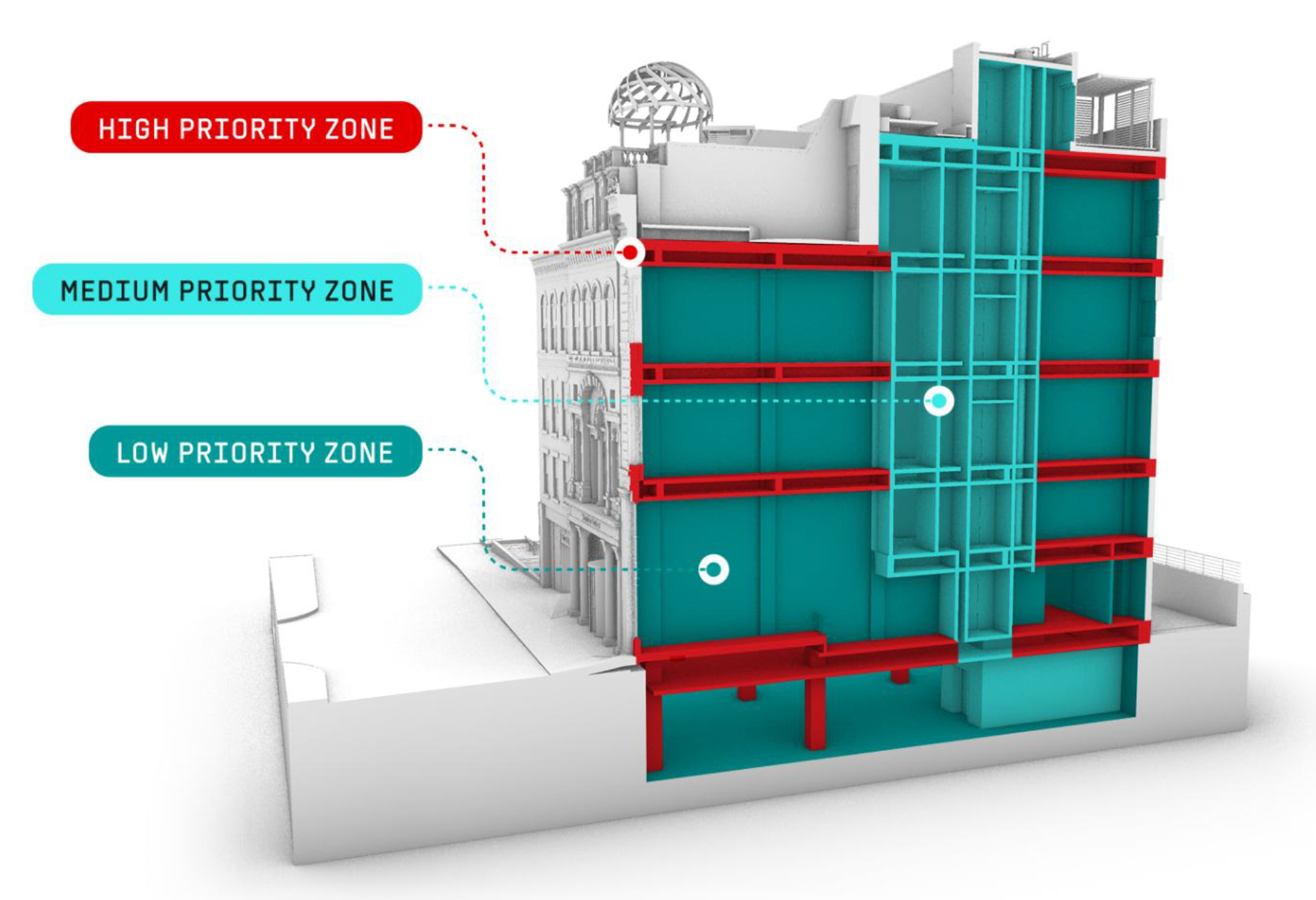
3D areas layered with priority ratings, so a service riser or a busy corridor gets more scrutiny than a low-stakes outlet run — without anyone having to eyeball the whole model to find what matters. - Stamps
A consistent way to flag where an issue sits and who owns it, with status indicators showing what's new, closed, or resolved at a glance. - A coding and classification system
A shared shorthand so anyone on a large project team can tell, at a glance, whether something belongs to selection set A or B, and act on it without a conversation. - Appearance Profiler
The same model, filtered to show each trade only what's relevant to them, so a plumber isn't scrolling past electrical clashes to find their own. - Automated clash tests
A well-structured template set can cover more ground than it looks like it should — Howden's team ran roughly 20 to 25 core components into more than 250 individual clash tests, running automatically rather than being rebuilt by hand each week.
None of these are one-off tools. Once built, they're the setup every subsequent project inherits, adjusted rather than reinvented.
What repeatable setup adds up to
The payoff of building this once is that a team doesn't need to scale headcount to match project volume. Over five years running this framework, Howden's team delivered 300 projects with roughly 1,500 collaborators, 5,000 reports, 50,000 drawing sheets, and close to 2 million issues tracked — figures he shared as his own team's account of that period, not an independently audited total. The team itself didn't grow to match that volume; the templated setup carried the load, freeing people to work on judgment calls instead of rebuilding infrastructure.
Learn the framework directly
This same approach — building a digital coordination framework out of reusable templates rather than one-off setup — is exactly what Revizto Academy's Template Essentials course covers in about 15 minutes, free, no license required.
It's the fastest way to see how codifying coordination works before applying it to your own projects.